
Applitools
AI visual testing and monitoring for applications
- Freemium
- Web, iOS, Android, API, Chrome Extension, Integration with CI/CD pipelines
- AI Tools for Test AutomationWritingAI Test Automation Tools
- Free plan available
- No credit card
What is Applitools?
Key features
Visual regression testing
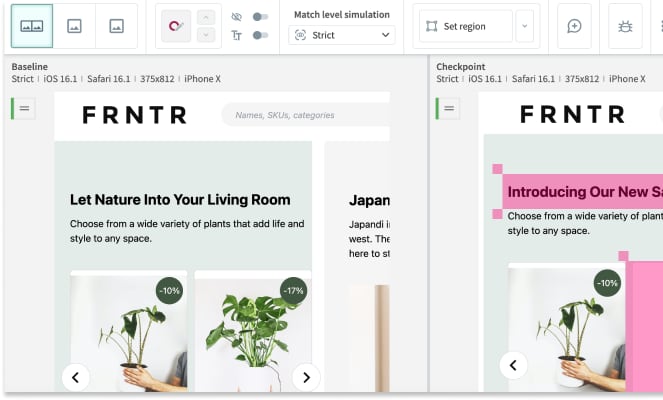
Captures baseline screenshots and compares new test runs to flag visual changes
AI-powered analysis
Machine learning algorithms distinguish meaningful visual changes from minor rendering differences and anti-aliasing noise
Cross-browser and device testing
Runs visual tests across different browsers, screen sizes, and operating systems
Test automation integration
Works with Selenium, Cypress, Playwright, and other popular testing frameworks
Monitoring and alerting
Continuously monitors live applications and alerts teams to unexpected visual changes in production
Root cause analysis
Provides detailed reports showing exactly what changed and where
Pros & cons
Advantages
- Catches visual bugs that traditional functional tests miss, particularly responsive design and layout issues
- Reduces the need for manual visual testing and screenshot comparison, saving QA time
- Integrates well with existing test automation workflows without requiring major refactoring
- Free tier is genuinely useful for small projects and teams trying out visual testing
Limitations
- Can generate false positives in areas with dynamic content, animations, or real-time data; requires careful baseline management
- Costs grow significantly with scale; high usage organisations may find per-checkpoint pricing expensive
Use cases
Testing responsive designs across multiple screen sizes to ensure layouts work on mobile, tablet, and desktop
Regression testing after design system updates or CSS changes to catch unintended side effects
Monitoring live production sites for visual degradation caused by third-party scripts or infrastructure issues
Testing complex UI components where pixel-perfect accuracy matters, such as data visualisation dashboards
Cross-browser testing for e-commerce sites where visual presentation directly affects conversion rates
Ready to try Applitools?
Pricing
Standard
Custom pricing based on checkpoint volume
Pay-per-checkpoint model; includes cross-browser testing, integration with popular frameworks, and basic monitoring
Enterprise
Custom pricing
Dedicated support, custom integrations, on-premise deployment options, advanced analytics and reporting
Get started with Applitools
Click through to Applitools and start using it now.
- Free plan available
- No credit card