AudioPen
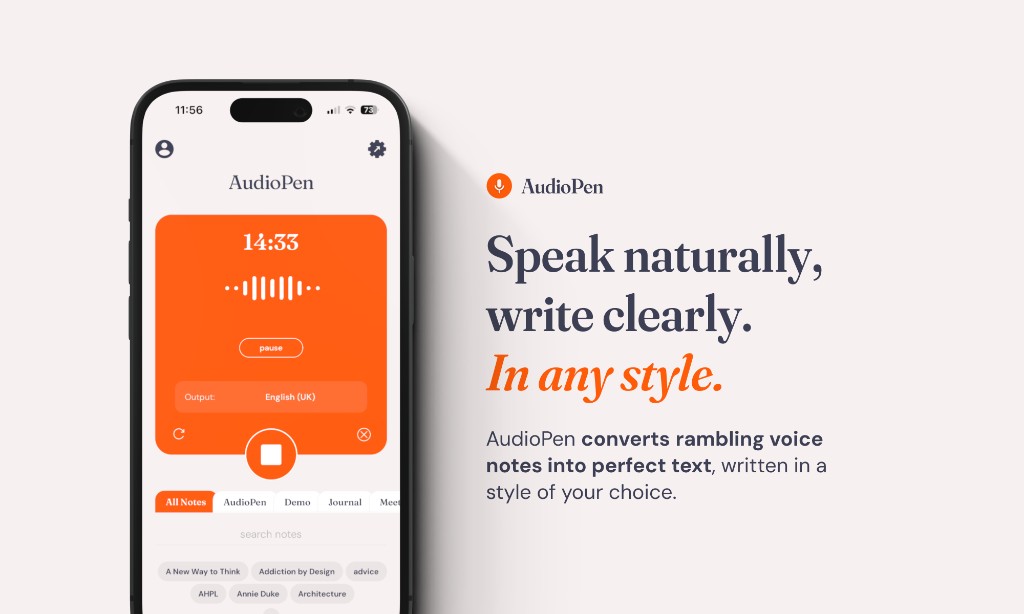
AudioPen is an innovative tool that transforms voice notes into clear text, facilitating the creation of meeting notes, memos, emails, articles, and more. Users simply need to speak, and the app handl
- Freemium
- Web, iOS, Android
- WritingAI Meeting AssistantsAI Tools for Content Writing
- Free plan available
- No credit card
What is AudioPen?
Key features
Voice-to-text transcription
Records your speech and converts it to written text
Text formatting and organisation
Structures transcribed content into coherent paragraphs and sections
Note templates
Provides formats for common document types like meeting notes and emails
Export options
Saves transcribed content in multiple formats for use in other applications
Freemium model
Basic transcription available free, with premium features for frequent users
Pros & cons
Advantages
- Fast capture of ideas without needing to type or write
- Useful for people with typing difficulties, mobility issues, or those who prefer speaking
- Frees up time for people whose work involves lots of note-taking or documentation
- Simple interface that requires minimal learning to use effectively
Limitations
- Transcription accuracy depends on audio quality and background noise, which may require editing
- Works best for individual use; less suitable for multi-speaker recordings where speaker identification matters
- Limited context awareness, so you may need to edit and refine output for professional documents
Use cases
Recording meeting notes during calls without pausing to type
Drafting emails and messages by speaking rather than typing
Creating article outlines or blog post notes from stream-of-consciousness recording
Capturing research notes or interview recordings for later reference
Writing memos, task lists, or project briefs while multitasking
Ready to try AudioPen?
Pricing
Premium
Subscription required
Higher monthly transcription limits, advanced formatting, priority processing
Get started with AudioPen
Click through to AudioPen and start using it now.
- Free plan available
- No credit card