
Hodor
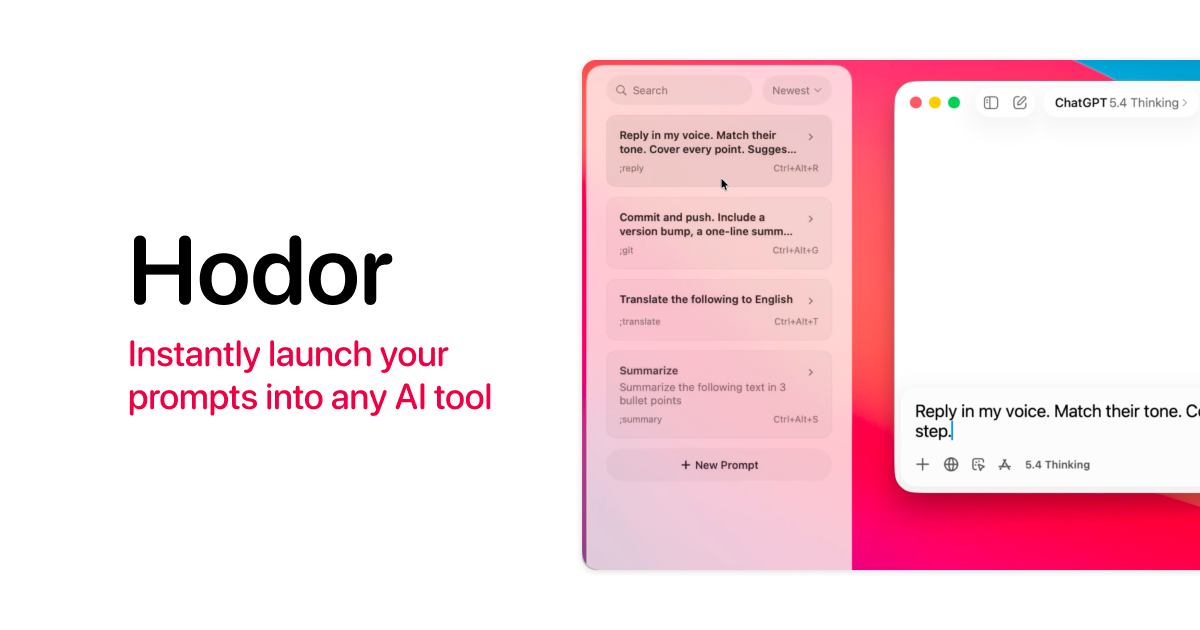
a 701KB native macOS prompt launcher for AI tools
- Free
- macOS
- Developer Tools
- Always free
- No credit card
What is Hodor?
Key features
Prompt library
Save and organise frequently used prompts with custom names and descriptions
Quick activation
Access your prompts via keyboard shortcut or menu bar, then paste into any AI tool
Native macOS integration
Runs natively on Apple Silicon and Intel Macs, respecting system conventions
Open source
Full source code available; modify or extend the tool as needed
Minimal footprint
701KB install size with no background resource drain
Multi-tool support
Works with any web-based AI platform, including ChatGPT, Claude, and others
Pros & cons
Advantages
- Completely free with no subscription or feature paywalls
- Extremely lightweight, does not consume meaningful system resources
- Works immediately without configuration; create and use prompts straight away
- Compatible with any web-based AI tool, not locked to specific platforms
- Open source allows inspection, customisation, and community contributions
- One-gesture access reduces friction when switching between prompts and AI tools
Limitations
- macOS only; Windows and Linux users cannot use this tool
- Designed for web-based AI tools, not desktop or API-based applications
- Requires you to manually create and maintain your own prompt library
- Pasting into web tools means no direct API integration or automation
- No cloud sync; prompts stored locally and not backed up across devices
- Niche use case; most benefit for users who repeatedly send similar prompts
Use cases
Designers and creative directors maintaining collections of art direction prompts for consistency
Software developers storing code review, debugging, and architecture prompts for quick reference
Writers keeping templates for different writing styles, tones, or content formats
Content creators standardising prompts for research, outline generation, or editing assistance
Product managers reusing competitor analysis or feature brainstorm prompts across projects
Educators and trainers managing prompt templates for student assessments or classroom activities
Ready to try Hodor?
Pricing
Free
Free
Unlimited prompt storage, full access to all features, open source codebase available
Get started with Hodor
Click through to Hodor and start using it now.
- Always free
- No credit card